Dependency Security
Dependency Security is a Labs feature. It is under active development — it works, but the data and screens may still change as we refine it. The Dependencies entry in the portal sidebar carries a Labs badge.
Most of Dam Secure reads your code and reasons about it. Dependency Security does something different: it reads your lockfiles and tells you which of the open-source packages you install have known vulnerabilities published against them.
Because a lockfile is an exact record of what gets installed, this analysis is deterministic. There is no judgement call about whether a package version is affected — either it is in the advisory's affected range or it is not.
What it covers
Dam Secure finds the lockfiles and manifests in your repositories automatically, wherever they live, including several projects inside a single repository. The versions they resolve are matched against public advisory data, which aggregates GitHub Security Advisories, PyPA, RustSec, and the language ecosystems' own feeds.
Supported ecosystems: npm (including pnpm and Yarn), PyPI, Maven, Go, NuGet, RubyGems, crates.io, Packagist, Hex, and Pub.
Three things worth knowing up front:
- Your dependencies are never installed or executed. Dam Secure reads lockfiles as text. It does not install your packages, run install scripts, or execute build tooling from your repository at any point.
- Your own packages are excluded. In a monorepo where workspace members reference each other, those internal packages are not inventoried and never produce issues. Only third-party packages do.
- No lockfile means no inventory. A project that commits only a loose manifest and resolves versions at install time has nothing exact to read. Packages from a private registry may still appear, but without advisories or licence data, because there is no public record of them.
What a dependency issue means
A dependency issue says: this repository installs a version of this package that a published advisory says is affected.
It does not say the vulnerable code is reachable from your application. A vulnerability in a function you never call is still reported, because the version is genuinely affected and an upgrade is still the fix. Judging reachability is something we are actively working on — until then, the Not reachable dismissal reason is how you record that judgement yourself.
Where to find it
The Dependencies screen has three tabs, and opens on Issues:
| Tab | Use it when you need to know |
|---|---|
| Issues | What to act on. The shortlist of packages with a known vulnerability, and the same list as the Issues screen's Dependency Issues tab |
| Inventory | What you install and where. Every third-party package across the organisation, vulnerable or not |
| Coverage | Whether that picture is complete. Which repositories have been scanned at all |
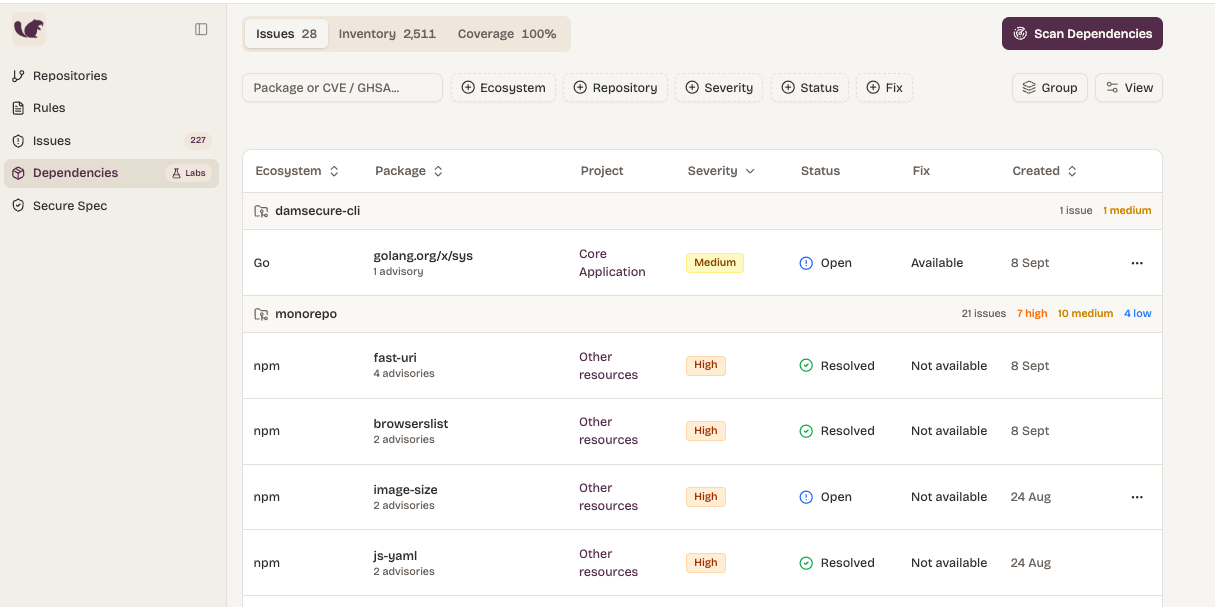
A repository's details page also carries a Dependencies card scoped to that one repository — its package counts, its worst advisory-bearing packages, and when it was last scanned.
The inventory
Reach for the inventory when the question is about your supply chain rather than about a vulnerability: what are we pulling in, how many versions of it are we carrying, which licences are we exposed to, and where would an upgrade actually have to land.
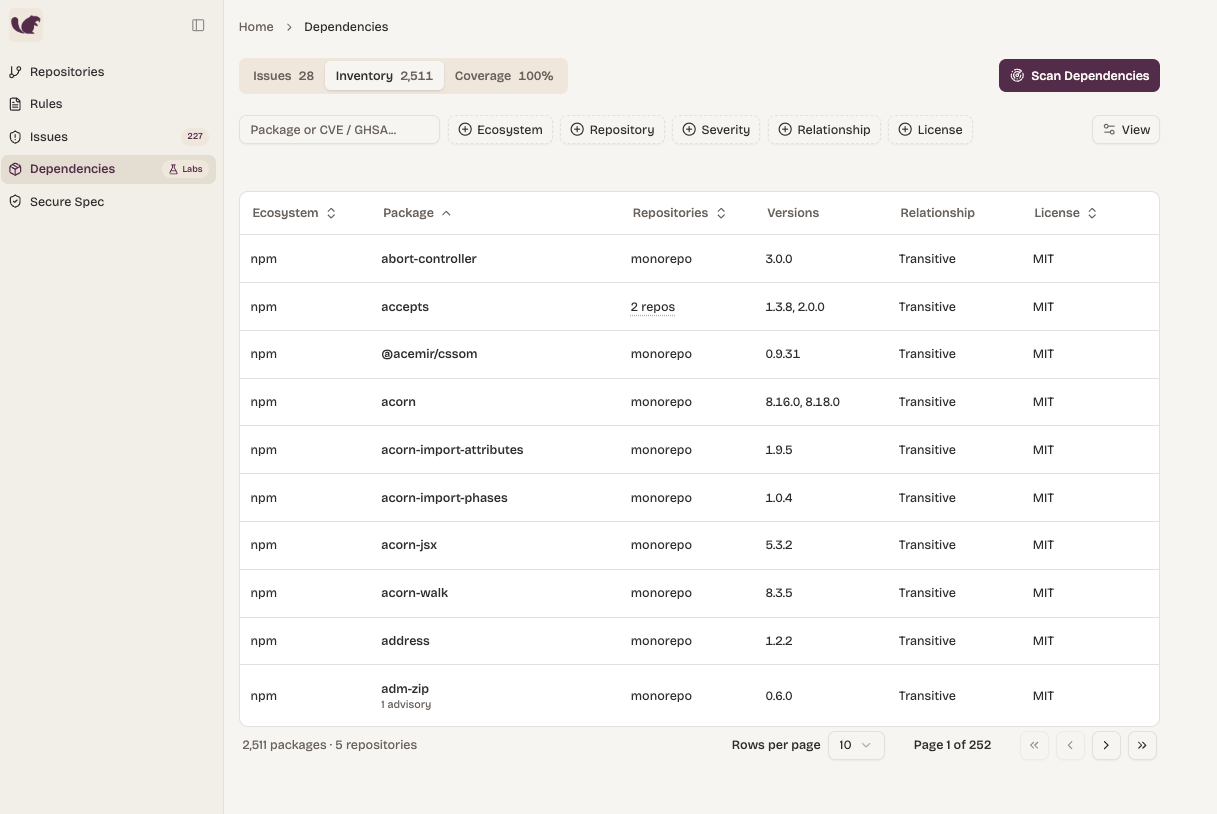
It is one row per package, not per install. Four repositories on three different versions of lodash is a single row telling you all of it.
| Column | What it tells you |
|---|---|
| Ecosystem | Which package registry it comes from |
| Package | The package name, with its advisory count beneath when it has one |
| Repositories | How many of your repositories install it — or the repository's name, when only one does |
| Versions | Which versions are in play across your organisation |
| Relationship | Direct, transitive, or mixed — see Relationship |
| License | The licence of a version we have on record |
Filters decide which rows appear, not what the numbers on those rows mean. Filter to a single repository and each package still shows its organisation-wide repository count, so a filtered view never quietly understates your exposure. When you want numbers scoped to one repository, use that repository's Dependencies card instead.
Selecting a package answers the question the list cannot: where, exactly. It shows every place your organisation resolves the package — each repository, each lockfile, and the version resolved there — plus every advisory affecting a version you actually have. It is also the right place for licence questions, since the list shows a single version's licence and a package that relicensed partway through its history has more than one.
Relationship
What you can do about a vulnerable package depends on how it got there:
- Direct — your project asked for it by name. Upgrading is a one-line change to your manifest.
- Transitive — it came in through something else. Upgrading usually means upgrading whatever requires it, or waiting for that package to move.
- Mixed — asked for directly in one project and inherited in another. Worth knowing before you assume one manifest edit covers it.
For some ecosystems and project layouts the relationship cannot be established with confidence. Dam Secure then shows nothing rather than guessing — an unlabelled package is unknown, not transitive.
Tracing one advisory
When a CVE lands and someone asks "are we exposed?", search the inventory for the exact CVE or GHSA identifier. The view switches to a blast radius: every repository that still resolves an affected version, the version it has, and the fixed versions the advisory names. Installs you have already upgraded past drop off it, so the list shrinks as you fix things.
A partial identifier like CVE-2021 stays an ordinary text search — you need the whole id. One CVE often maps to several ecosystem-specific advisory records, and searching either identifier finds the same exposure.
Coverage
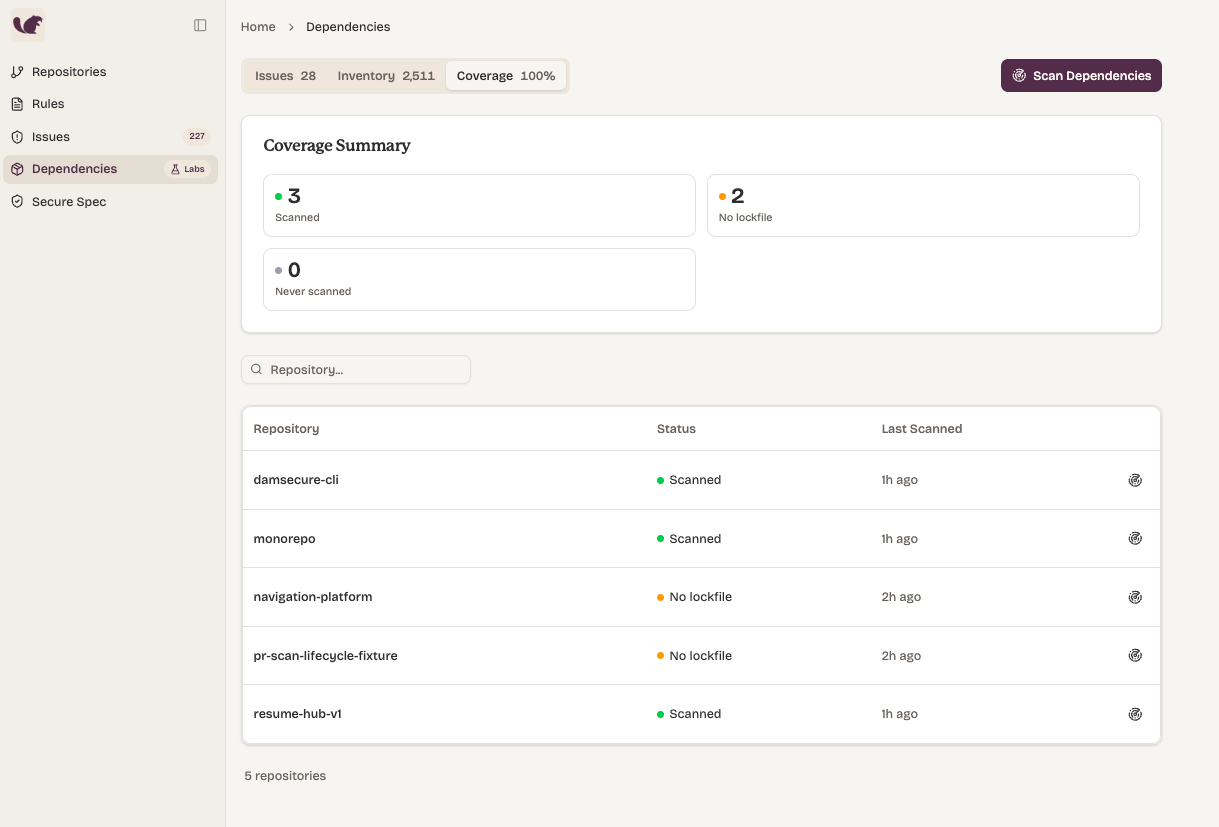
Coverage is how you check that the inventory is worth trusting before you draw a conclusion from it. It lists every enabled repository, scanned or not, above a summary of how many are in each state.
| Status | What it means |
|---|---|
| Scanned | We read its lockfiles and it has a dependency inventory |
| No lockfile | We scanned it and found nothing to read. Nothing is wrong; there is simply no exact dependency list to inventory |
| Never scanned | No dependency scan has run against it yet. This is the real gap |
The difference between the last two is the point of the tab. A No lockfile repository has been looked at — its last-scanned time is real, and scanning it again changes nothing until a lockfile is committed. Never scanned is the one worth acting on.
Only enabled repositories are counted, so a repository you scanned and later disabled cannot push your coverage above 100%. The headline percentage is rounded, so 99.6% displays as 100 while the counts underneath still differ — read the counts when you need to know whether anything is missing.
Scanning on demand
Dependencies are scanned automatically overnight, on the cadence set for your organisation — weekly by default. Scan on demand when you cannot wait for tonight: a vulnerability has just been published, or you have added a repository and want it in the picture now.
A dependency scan always covers a whole repository, so Scan Dependencies means "scan the repositories behind what I am looking at". There are two places to start one:
| Where you click | Scans |
|---|---|
| Scan Dependencies, in the Dependencies header | Every repository with an open dependency issue, plus every repository never scanned |
| A Coverage table row | That one repository |
Those two sets are scanned together, not one or the other. A repository added after your first scan has no issues to match on and no inventory yet, so without the second set the header button could never reach the one repository nobody had looked at.
Scanning costs real work per repository, so it is bounded: one click starts up to 25 repositories, each repository has a short cooldown, and a scan already running is not started again. When some repositories are skipped you are told why. A scan that starts nothing at all is reported as information, not an error — usually everything you selected was scanned moments ago.
Dependency issues
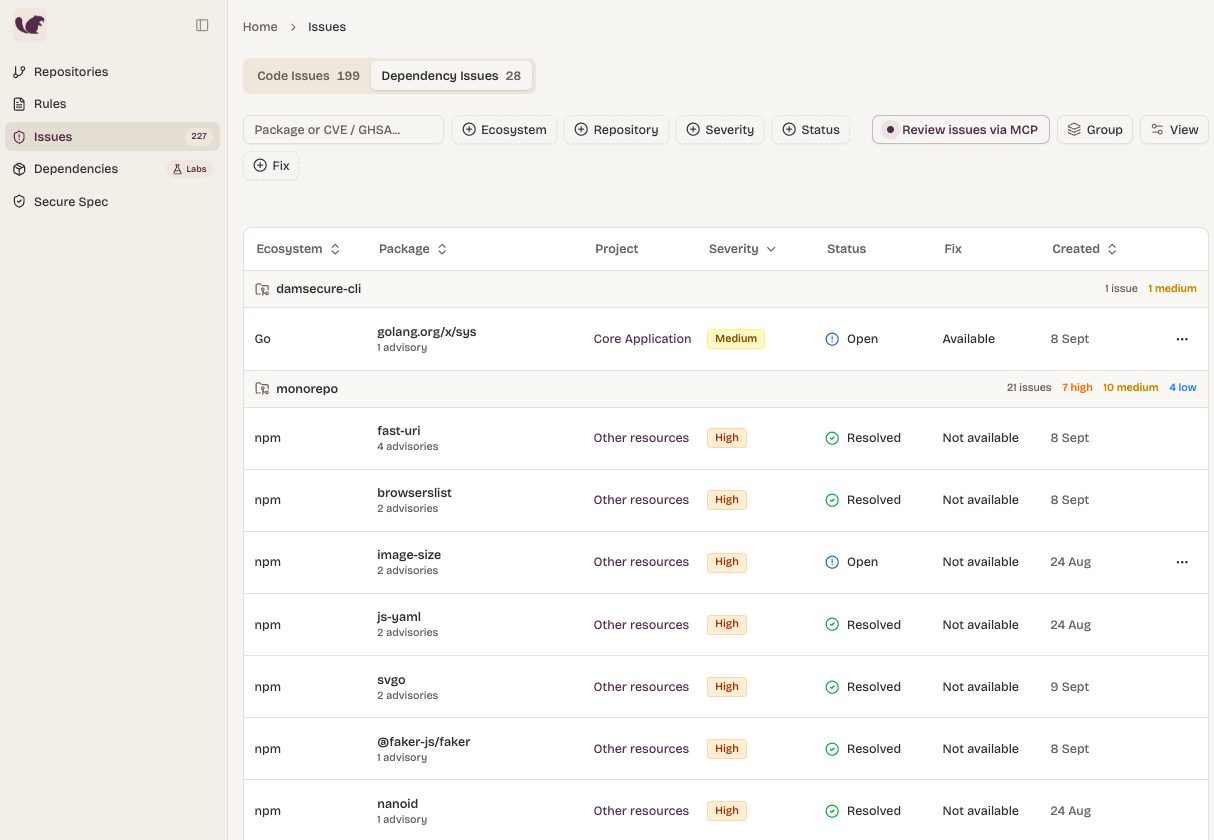
This is the working list: what to act on, as opposed to the inventory's picture of everything you install. The Issues screen has a Dependency Issues tab alongside your code issues, and the Issues count in the sidebar covers both lanes — your total outstanding security work, not code issues alone.
An issue is one package in one repository. If three advisories name lodash in the same repository, that is one issue with three advisories inside it, because nobody upgrades lodash three times. The same vulnerable package in two repositories is two issues, tracked separately, because they are two pieces of work owned by potentially different teams.
| Column | What it tells you |
|---|---|
| Ecosystem | Which package registry the package comes from |
| Package | The package name, with its advisory count beneath |
| Repository | Which repository this issue belongs to |
| Project | The project whose lockfiles pull the package in — a dash when more than one does |
| Severity | The highest severity across the advisories in the issue |
| Status | Open, Dismissed, or Resolved |
| Fix | Whether a fixed version exists that this repository could move to |
| Created | When the issue was first detected |
Fix reads Available, Not available, or Mixed, and only counts a fix that applies to a version this repository actually resolves — an advisory patched on a release line you are not on is not a fix you can take.
Filter by search, ecosystem, repository, severity, status or fix availability; search takes a package name or an exact advisory id. Group by repository, the unit somebody owns, or by ecosystem for a sweep of one language. Grouping folds the column you grouped by into the headings.
Filter to Open with Fix available to get the work that is both real and actionable right now.
Status
You never set an issue's status directly. You dismiss or restore advisories, scans resolve them, and the status follows:
- Open — at least one advisory is neither resolved by a scan nor dismissed by you. This is the work.
- Dismissed — nothing is open, and at least one advisory was dismissed in triage.
- Resolved — every advisory was resolved by a scan.
A scan resolves an advisory in one of three ways, kept distinct on purpose: Fixed (still installed, at a version the advisory no longer affects), Removed (the package left the repository), or Withdrawn (you are still on an affected version, but the advisory was retracted upstream). Crediting you with a fix you never made would be worse than saying nothing.
An issue only resolves after a scan that read the repository completely — "we did not see it" is not the same as "it is gone". And an issue that resolves and later reappears reopens rather than arriving as new, keeping its original first-detected date.
Triage
Dismissing tells Dam Secure you have made a decision about an advisory, so it stops counting against you without disappearing. You can dismiss one advisory from the issue's detail view, or the whole issue, which dismisses every advisory under it that is currently open — advisories somebody already dismissed keep their own reason and note, so this adds to a partly-triaged issue rather than flattening it.
Every dismissal records a reason, and can carry a free-text note:
| Reason | Use it when |
|---|---|
| Accepted risk | Real, understood, and you are choosing to carry it |
| Not reachable | Your code never reaches the vulnerable part of the package |
| Mitigated | Something else already neutralises it |
| Won't fix | You are not going to act on it |
| Other | Anything else — leave a note |
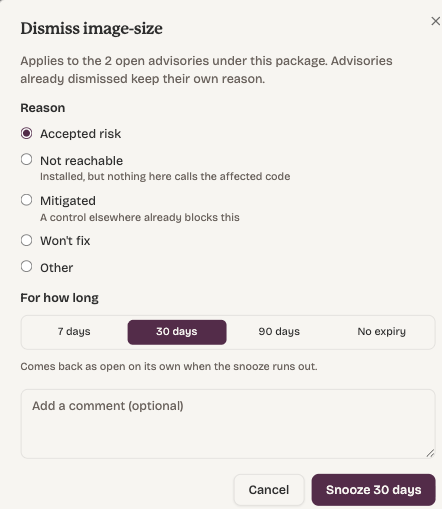
Snoozing. A dismissal can carry an expiry instead of being permanent, and the advisory returns to Open by itself when it lapses. The dialog offers 7, 30 or 90 days — 30 by default — or No expiry for a dismissal that stands until you restore it. The status of dependency issues can also be managed via the MCP.
Use a snooze when the answer is "not now" rather than "not ever": a permanent dismissal quietly becomes wrong when circumstances change, whereas a snooze comes back and asks again.
Restoring. Restore a single advisory, or use Restore all on an issue to undo every dismissal under it, lapsed snoozes included.
Fixing an issue
The issue's detail view has a Fix button that hands the upgrade to a coding agent — Fix in Cursor, Fix in Claude Code, or Copy fix prompt to paste it somewhere yourself. It remembers your choice and shares it with the Fix button on code issues.
The prompt is scoped to the whole issue rather than one advisory, because that is the shape of the work: a package is upgraded once, to a version clearing everything against it. It names the versions installed, where each is pinned, every open advisory with its fixed version, and a link back to the issue.
Clicking Fix records nothing, and there is deliberately no "mark as fixed" on a dependency issue. Whether a repository still installs a vulnerable version is something scans observe, not something anyone can assert — a hand-set status would either be overwritten by the next scan or, worse, survive one and report a repository as clean while the affected version sits in its lockfile.
So the upgrade is the fix. Land it, and the next scan resolves the issue by itself.
Fix is offered on the detail view only. The row menu in the list is triage — dismiss and restore — because the prompt needs the installed versions and each advisory's fixed version, and neither is on the row.
From your editor
With the Dam Secure MCP set up, your agent can do all of this without the portal. It can list and filter dependency issues, open one to get every advisory with its severity, fixed versions and triage state along with the manifests and versions that install the package — then make the upgrade in your working tree, and dismiss, snooze or restore whatever you decide not to take.
There is no "fix" tool to call, for the same reason there is no "mark as fixed" button: the upgrade happens in your repository, and the next scan is what resolves the issue.
See Installation to configure it, or the MCP overview for what else it exposes.
How this relates to code issues
Dependency issues and code issues sit side by side but come from different analysis and are not deduplicated against each other. Code issues come from rules evaluated against your source; dependency issues come from matching installed package versions against public advisories — no rules involved, and nothing for you to configure.
Getting access
Dependency Security is enabled per organisation while it is in Labs. If you do not see Dependencies in the portal sidebar, it is not switched on for your organisation yet — talk to your Dam Secure contact. The same applies to how often your repositories are re-read: tell us the cadence you want and we will set it.
Two pieces we are working on next:
- Reachability — telling you whether the vulnerable code in a package is actually reached from your application, so you can prioritise what matters.
- Per-repository control — turning Dependency Security off for an individual repository, rather than for the whole organisation.